
claude code 와 gemini cli 비교
동일한 SPEC.md 파일을 주고 동일한 프롬프트로 대학 수업 시간표 웹앱을 만들어 봤습니다.
성능 차이가 있다고 생각했는데, 의외로 크게 다르지 않은 결과가 나왔습니다.
두 경우 모두 권한 동의만으로 아래와 같은 결과물이 나왔습니다.
(데이터인 시간표는 임의로 작성했습니다)
claude code
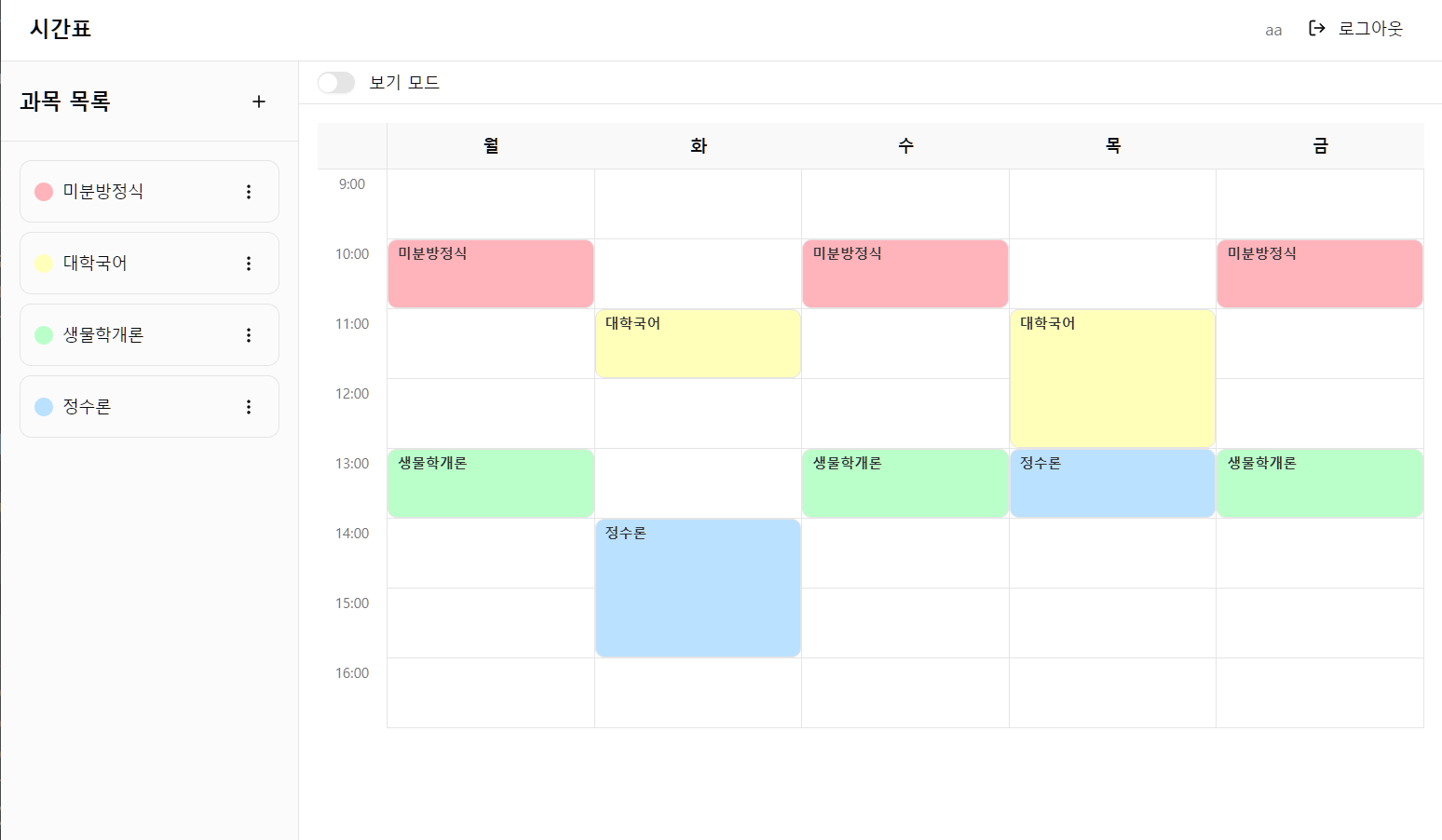
데모 : https://timetable-ten-sigma.vercel.app/
claude code 가 좀 더 사용자 친화적입니다.
배포를 위해 sqlite를 turso 로 변환할 때, 사용자가 할 일을 알려주더군요.
다음 단계:
  1. Turso CLI로 DB 생성: turso db create timetable
  2. URL/토큰 확인: turso db show timetable --url / turso db tokens create timetable
  3. .env에 실제 값 설정
  4. npx drizzle-kit push로 스키마 적용
  5. npm run dev로 동작 확인
gemini cli 는 어떤 명령을 사용하라는 말을 해 주지 않습니다. (turso 문서 찾아보라는…)
아직 gemini는 사용자를 위한 디테일이 부족한 느낌이네요.
gemini cli
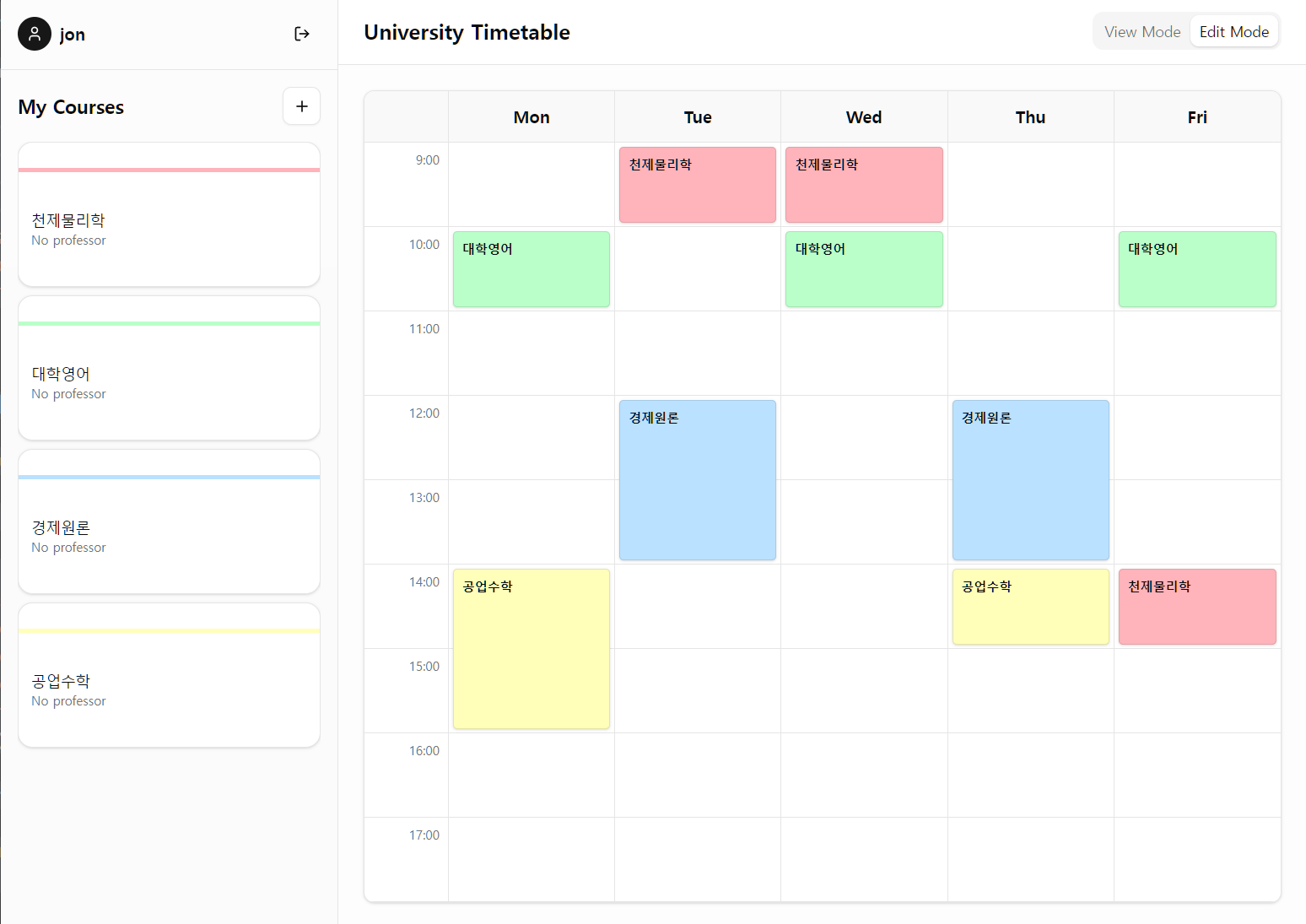
데모 : https://university-timetable-rho.vercel.app/
개인 취향이겠지만 ui 가 깔끔한 것은 gemini cli 쪽이었습니다.
입력 내용
SPEC.md
제시된 모든 요구사항(기능, UX, 기술 스택)을 종합하여 작성한 최종 **Technical Specification**입니다.
이 문서는 **Next.js 15+**, **SQLite (Drizzle ORM)**, **better-auth**, **shadcn/ui**를 기반으로 작성되었습니다.

---

# Technical Specification: University Timetable Application

## 1. 개요 (Overview)

본 프로젝트는 대학생을 위한 개인화된 웹 기반 주간 시간표 관리 애플리케이션이다. 사용자는 계정을 생성하여 자신의 수강 과목을 관리하고, 주간 뷰(Weekly View) 상에서 드래그 앤 드롭 인터페이스를 통해 직관적으로 시간표를 구성할 수 있다.

## 2. 기술 스택 (Tech Stack)

* **Framework:** Next.js 15+ (App Router)
* **Language:** TypeScript
* **Database:** SQLite (Local file or LibSQL)
* **ORM:** Drizzle ORM
* **Authentication:** better-auth (Email & Password Strategy)
* **UI Library:** shadcn/ui (Radix UI + Tailwind CSS)
* **Styling:** Tailwind CSS
* **Icon Set:** Lucide React
* **State Management:** React Hooks + Server Actions

---

## 3. 데이터베이스 스키마 (Database Schema)

데이터베이스는 **SQLite**를 사용하며, **Drizzle ORM**을 통해 정의한다.
`better-auth` 구동을 위한 필수 테이블 4개와 애플리케이션 고유 테이블 2개로 구성된다.

### 3.1. Auth Core Tables (better-auth)

```typescript
// schema/auth.ts
import { sqliteTable, text, integer } from "drizzle-orm/sqlite-core";

export const user = sqliteTable("user", {
  id: text("id").primaryKey(),
  name: text("name").notNull(),
  email: text("email").notNull().unique(),
  emailVerified: integer("email_verified", { mode: "boolean" }).notNull(),
  image: text("image"),
  createdAt: integer("created_at", { mode: "timestamp" }).notNull(),
  updatedAt: integer("updated_at", { mode: "timestamp" }).notNull()
});

export const session = sqliteTable("session", {
  id: text("id").primaryKey(),
  userId: text("user_id").notNull().references(() => user.id, { onDelete: 'cascade' }),
  token: text("token").notNull().unique(),
  expiresAt: integer("expires_at", { mode: "timestamp" }).notNull(),
  ipAddress: text("ip_address"),
  userAgent: text("user_agent"),
  createdAt: integer("created_at", { mode: "timestamp" }).notNull(),
  updatedAt: integer("updated_at", { mode: "timestamp" }).notNull()
});

export const account = sqliteTable("account", {
  id: text("id").primaryKey(),
  userId: text("user_id").notNull().references(() => user.id, { onDelete: 'cascade' }),
  accountId: text("account_id").notNull(),
  providerId: text("provider_id").notNull(),
  password: text("password"), // Hashed Password goes here
  accessToken: text("access_token"),
  refreshToken: text("refresh_token"),
  createdAt: integer("created_at", { mode: "timestamp" }).notNull(),
  updatedAt: integer("updated_at", { mode: "timestamp" }).notNull()
});

export const verification = sqliteTable("verification", {
  id: text("id").primaryKey(),
  identifier: text("identifier").notNull(),
  value: text("value").notNull(),
  expiresAt: integer("expires_at", { mode: "timestamp" }).notNull(),
  createdAt: integer("created_at", { mode: "timestamp" }).notNull(),
  updatedAt: integer("updated_at", { mode: "timestamp" }).notNull()
});

```

### 3.2. Application Tables (Timetable)

```typescript
// schema/app.ts
import { sqliteTable, text, integer } from "drizzle-orm/sqlite-core";
import { user } from "./auth";

// 수강 과목 정보
export const course = sqliteTable("course", {
  id: text("id").primaryKey(), // UUID
  userId: text("user_id").notNull().references(() => user.id, { onDelete: 'cascade' }),
  name: text("name").notNull(),      // 과목명 (필수)
  room: text("room"),                // 강의실
  credits: integer("credits"),       // 학점
  professor: text("professor"),      // 교수명
  color: text("color").notNull(),    // 캘린더 표시 색상 (HEX)
  createdAt: integer("created_at", { mode: "timestamp" }).default(sql`(strftime('%s', 'now'))`),
});

// 시간표 배치 정보
export const timeSlot = sqliteTable("time_slot", {
  id: text("id").primaryKey(), // UUID
  userId: text("user_id").notNull().references(() => user.id, { onDelete: 'cascade' }),
  courseId: text("course_id").notNull().references(() => course.id, { onDelete: 'cascade' }),

  // 0: 월요일 ~ 4: 금요일
  dayOfWeek: integer("day_of_week").notNull(),

  // 9 ~ 16 (오전 9시 ~ 오후 4시 시작)
  startHour: integer("start_hour").notNull(),

  // 수업 길이 (시간 단위, 기본 1)
  duration: integer("duration").notNull().default(1),
});

```

---

## 4. 상세 기능 명세 (Functional Requirements)

### 4.1. 인증 (Authentication)

* **진입점:** `/login`, `/register`
* **구현:** `better-auth`의 Email/Password Credential Provider 사용.
* **보안:** 비밀번호는 해시 처리되어 `account` 테이블에 저장됨.
* **세션:** 로그인 성공 시 세션 토큰 발행, Middleware에서 보호된 라우트 접근 제어.

### 4.2. 수강 과목 관리 (Course Management)

* **위치:** 사이드바 (데스크톱) 또는 드로어 (모바일).
* **기능:**
* **조회:** 로그인한 사용자의 과목 리스트 표시 (`Card` 컴포넌트 사용).
* **생성:** `Dialog` 모달을 통해 입력 폼 제공.
* 입력 항목: 과목명(필수), 강의실, 학점, 교수명.
* 색상: 시스템이 제공하는 파스텔톤 팔레트 중 하나를 선택하거나 자동 할당.


* **수정/삭제:** 리스트 아이템의 `DropdownMenu`를 통해 접근.


### 4.3. 주간 시간표 뷰어 (Timetable View)

* **구조:**
* **Grid:** 5 Columns (월~금) x 8 Rows (09:00 ~ 17:00).
* **Cell:** 각 셀은 1시간 단위를 나타냄.


* **하이라이트 (Highlight):**
* 클라이언트 시스템 시간을 1분 주기로 체크.
* 현재 요일(월~금)과 시간(09~17)이 일치하는 Grid Cell에 `ring-2 ring-primary` 스타일 적용.


* **블록 렌더링:**
* `timeSlot` 데이터를 기반으로 해당 위치에 `div` 블록 렌더링.
* `row-span-{duration}` 클래스를 사용하여 2시간 이상의 연강 표현.
* 배경색은 연결된 `course`의 `color` 속성 사용.


### 4.4. 시간표 편집 (Edit Mode)

* **모드 전환:** 상단 `Tabs` 또는 `Switch`로 [보기 모드] / [편집 모드] 전환.
* **드래그 앤 드롭 로직:**
1. **MouseDown:** 빈 시간 슬롯 클릭 시 시작점 저장.
2. **MouseMove:** 드래그 중인 영역(Start ~ Current)을 반투명 색상으로 프리뷰 표시. (단, 요일 변경 불가, 17시 초과 불가)
3. **MouseUp:** 드래그 종료 시 `Popover` 또는 `Dialog` 호출.


* **과목 선택:**
* `Command` 컴포넌트(검색 가능한 리스트)가 팝업됨.
* 기존 등록된 과목 중 하나를 선택.
* 선택 즉시 Server Action 호출 -> DB 저장 -> UI 갱신.


* **충돌 처리:** 이미 수업이 있는 시간에 드래그하여 배치할 경우, 기존 수업을 덮어쓸지 확인하거나 자동으로 교체(Overwrite).

---

## 5. UI 디자인 (shadcn/ui Components)

### 5.1. 레이아웃

* **Sidebar:** `ScrollArea` (과목 리스트), `Button` (과목 추가).
* **Main:** CSS Grid + Tailwind Utility Classes.

### 5.2. 컴포넌트 매핑

| 기능 | shadcn/ui 컴포넌트 | 비고 |
| --- | --- | --- |
| **로그인 폼** | `Card`, `Form`, `Input`, `Button` | react-hook-form + zod 연동 |
| **과목 추가** | `Dialog`, `RadioGroup` (색상 선택) | 모달 창 |
| **모드 전환** | `Tabs` or `Switch` | 보기/편집 모드 |
| **과목 선택** | `Popover`, `Command` | 드래그 종료 후 검색/선택 |
| **알림** | `Sonner` (Toast) | 저장/삭제 성공 메시지 |
| **메뉴** | `DropdownMenu` | 과목 수정/삭제 옵션 |
| **툴팁** | `Tooltip` | 시간표 블록 상세 정보 (교수명 등) |

---

## 6. API 및 데이터 흐름 (Data Flow)

Next.js App Router의 특성을 살려 REST API 대신 **Server Actions** 위주로 구성한다.

### 6.1. Server Actions (`/app/actions.ts`)

* `getCourses()`: 현재 세션 유저의 과목 목록 반환.
* `getTimeSlots()`: 현재 세션 유저의 시간표 목록 반환.
* `createCourse(data)`: 과목 생성 및 색상 할당.
* `updateCourse(id, data)`: 과목 정보 수정.
* `deleteCourse(id)`: 과목 및 관련 시간표 삭제 (Cascade).
* `saveTimeSlot(courseId, day, start, duration)`: 시간표 배치 저장 (기존 슬롯 충돌 시 삭제 후 삽입 트랜잭션).

### 6.2. Client Interaction

* Server Actions는 `useTransition` 훅과 함께 호출하여 로딩 상태를 관리한다.
* 데이터 변경 후 `revalidatePath('/')`를 통해 서버 컴포넌트를 갱신한다.

---

## 7. 개발 로드맵 (Milestones)

1. **Setup:** Next.js, Tailwind, shadcn/ui, Drizzle, SQLite 설치 및 설정.
2. **Auth:** `better-auth` 설정, 로그인/회원가입 페이지 구현.
3. **Course CRUD:** 사이드바 UI 및 과목 추가/삭제 기능 구현.
4. **Grid UI:** 5x8 그리드 레이아웃 작성 및 반응형 처리.
5. **Logic:** 드래그 앤 드롭 상태 관리 로직 및 시각적 피드백 구현.
6. **Integration:** 드래그 종료 -> 과목 선택 -> DB 저장 연결.
7. **Highlight:** 현재 시간 하이라이트 기능 추가.
프롬프트 명령
SPEC.md 를 참고하여 현재 디렉토리에 프로젝트를 구성해 줘