
이런 개발자 ㅠ
dk .. 변태네요.
쉬지 않고 15시간을 태웠 ..
닷넷8에서 루트 유저를 사용하지 아니하여 서버를 구동 하려고 약간의 업데이트가 있었는데요.
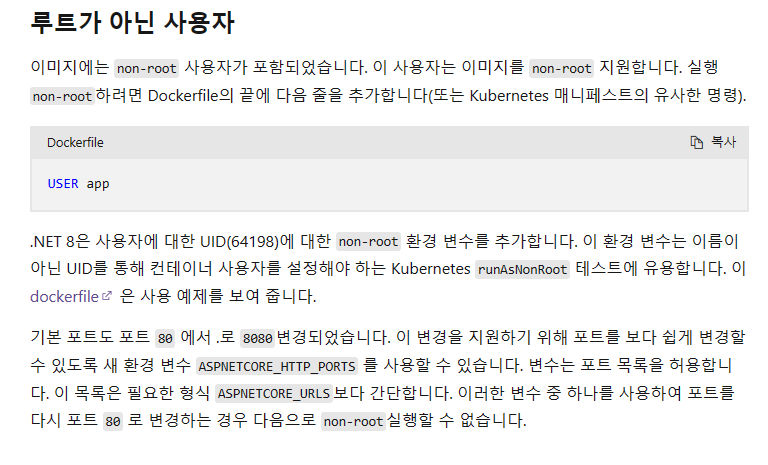
유심히 살펴보면 app그룹과 app사용자를 추가 하였다는 얘기이지 정상적으로 작동 된다고 하지 않았어요.
분명 .. 루트리스 모드에서는 0~1024 시스템 포트할당 정책에 위배되므로 80번이나 443과 같은 주요 포트를 점유하려고 하면 permission denied 뜨면서 예외가 날 것이어요.
간단한 방법이 있는데 호스트 컴퓨터에 보안을 포기하고 net.ipv4.ip_unprivileged_port_start=0를 /etc/sysctl.conf에 집어넣는 방법과, 컨테이너에서 8080, 8443 포트를 열고 80,443으로 포트포워딩을 걸면 좋아요.
이런데 .. %!
환경변수 기본값 포트넘버 삭제 (ASPNETCORE_HTTP_PORTS, ASPNETCORE_HTTPS_PORTS, ASPNETCORE_HTTPS_PORT)
appsettings.json (Kestrel:Endpoint 에서 Http, Https 모두 Url 포트넘버 변경)
UseKestrel 삭제, ConfigureKestrel 에서 포트넘버 직접 변경
하여도 바뀌지 않고, 심지어 1,2,3 다 삭제하여도 여전히 같은 문제가 나타나는데 하드코딩을 하였나 보아요.
> sh -m -c "cd /app && dotnet example.dll" -- app
// ~~ 대충 시작 경로를 변경한 뒤 app 계정으로 셸 명령어를 실행 ..
info: Microsoft.Hosting.Lifetime[14]
      Now listening on: http://[::]:80
Microsoft.Hosting.Lifetime: Information: Now listening on: http://[::]:80
info: Microsoft.Hosting.Lifetime[14]
      Now listening on: https://[::]:443
Microsoft.Hosting.Lifetime: Information: Now listening on: https://[::]:443
info: Microsoft.Hosting.Lifetime[0]
      Application started. Press Ctrl+C to shut down.
이러면 루트리스 상태에서 실행이 안되지 않겠나요.
(appsettings.json) Kestrel:Endpoints 속성값 중 Http, Https를 초기화 해버리는 아주 나쁜 부분을 봐버렸어요!
{
  "ConnectionString": {
    "AnytimeConnection": "~~"
    "DefaultConnection": "Server=(localdb)\\MSSQLLocalDB;Database=_CHANGE_ME;Trusted_Connection=True;MultipleActiveResultSets=true",
    "MysqlConnection": "server=mysql1;port=3306;uid=root;pwd=p4ssw0rd;database=test;charset=utf8"
  },
  "Kestrel": {
    "EndpointDefaults": {
      "Protocols": "Http1AndHttp2AndHttp3",
      "SslProtocols": [ "Tls12", "Tls13" ]
    },
    "Endpoints": {
      "Http": {
        "Url": "http://*:*" <- "http://*:8080"
      },
      "Https": {
        "Url": "https://*:*" <- "https://*:8443"
      }
    }
  },
  "AllowedHost": "*"
}
다른 파일에 초기화 걸리는 설정을 옮겨놓고, 대충 이케이케 고치는 핵써서 루트리스로 돌려보면 ..

안 될 리가 있겠나요.
여기는 M$g로 심하게 절여진 곳이라, 슬쩍 데리고 간다고 아무렇게나 따라가믄 안되지 않겠나요!
